How to Generate a Fully structured quiz from any document
Auto-Generated Quizzes From Any Document
At a Glance
FlexAssessments is the platform’s engine for quizzes, tests and surveys. “Create from PDF” builds one from a document you already have, returning a ten-question multiple-choice quiz in a single step.
Writing ten questions by hand, with plausible wrong answers and a verified correct one, takes an experienced designer at least half an hour.
Input
Any PDF Document
Output
10-question multiple-choice quiz
Answer Options Per Question
4
Language Support
Multiple languages via selector
Source Constraint
Al uses only the uploaded document
Includes
Question, options, correct answer, justification
Time to Generate
Seconds
Where it Lives
FlexAssessments admin menu
From document to quiz in three steps
The feature lives in the FlexAssessments admin area. There is no question editor to fill in and no template to find. You supply a document, and the platform builds the assessment.
1. Open FlexAssessments
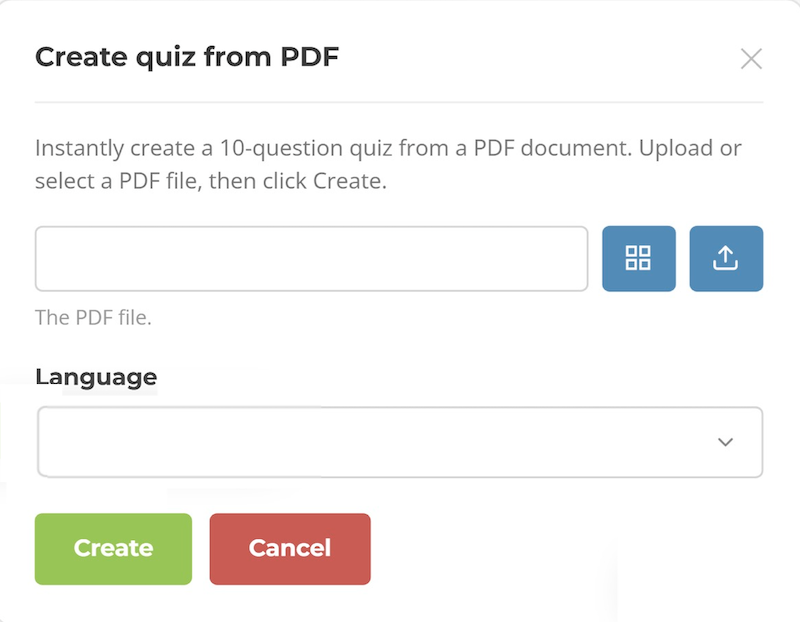
In the platform admin menu, go to FlexAssessments. Click the Action button and choose Create from PDF.
2. Upload your PDF
Select or upload the document you want to test, then choose your preferred language for the questions and answers.
3. Generate and deploy
Click Create. A ten-question quiz is generated automatically. Review it, adjust anything you want, and add it to your learning event.
The AI Creates The Assessment. You Review It And Deploy It.
Most assessments start with a blank question editor. This one starts with a finished, ten-question quiz. Take a look at the basics of what you can expect from vLearning FlexAssessments or request a walkthrough to see it in action.